Mine Antarctica Controls
PC inputs, HUD readouts, and how to turn movement into Cash on the mountain.
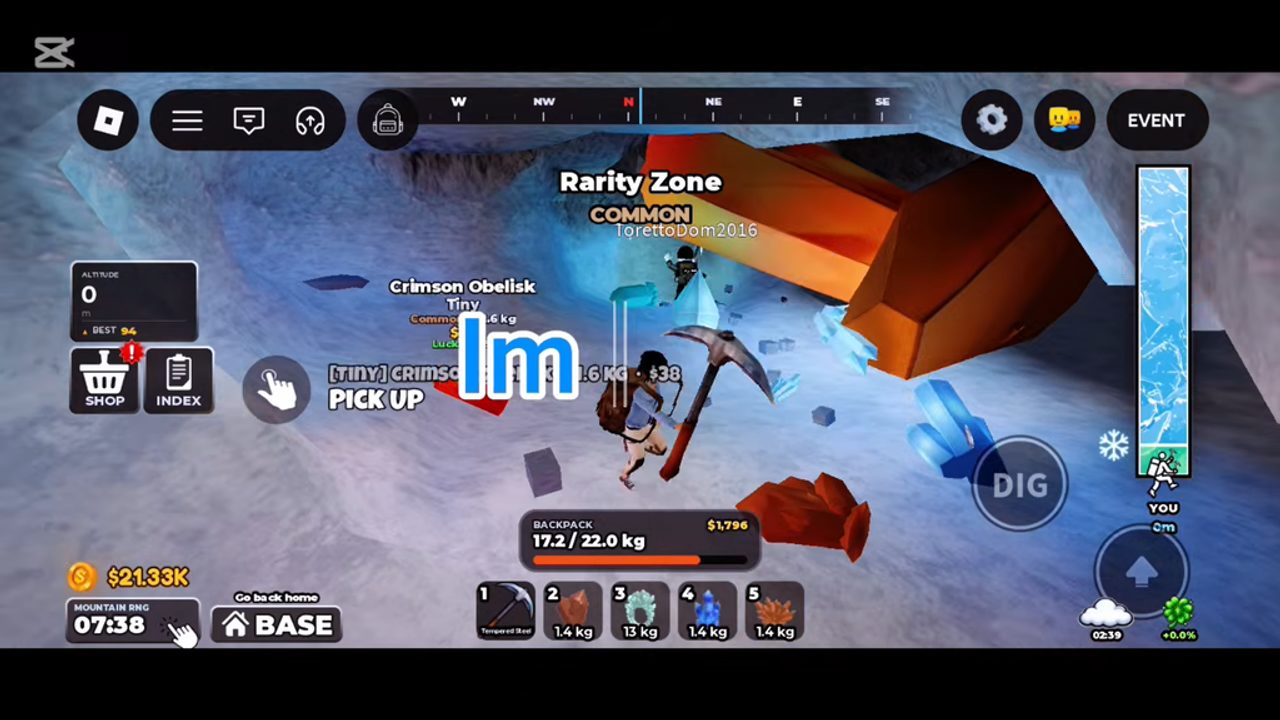
Why controls matter in Mine Antarctica
Mine Antarctica by PolarMine Games looks simple on paper — climb, swing, sell — but the players who progress fastest are the ones who never fumble a teleport, never miss an interact prompt, and always know what the HUD is saying about altitude and Cash. This Controls Guide is the input-and-interface companion to Getting Started and the Climb Higher warmth deep dive. Master the bindings once, then spend your brainpower on upgrade order instead of “where did BASE go?”
Roblox input can differ by device. The table below is the PC default layout used in most community videos and wiki screenshots. Mobile touch buttons and console remaps exist; if a prompt on your screen disagrees with this page, trust the live HUD label for your platform.
PC controls (default)
| Input | Action |
|---|---|
| WASD | Move your miner around the Antarctic zone |
| Space | Jump — essential for cliff ledges and mid-route resets |
| E | Interact / equip / confirm contextual prompts (vendors, tools, UI actions) |
| LMB (left mouse) | Swing pickaxe / mine rock and crystals |
Workflow in practice: face the node, make sure the pickaxe is equipped, then LMB until the crystal pops. Use E when a shop, Gem Buyer, garden plot, or tool prompt appears. Jump with Space to clear small gaps instead of walking long switchbacks when your warmth budget is tight.
Mobile and console notes
On mobile, movement is usually a virtual stick, jump is a separate button, mining is a tap/hold on the dig control, and interact appears as an on-screen prompt rather than a keyboard E. Console players should open Roblox’s in-experience controls overlay if LMB-equivalent dig feels wrong after a patch. The systems are identical — Climb Higher, Carry More, Mountain RNG, Gem Buyer — only the finger/stick mapping changes. If you switch devices mid-account, do one short foothill run just to re-learn dig timing before you push past the early cold wall.
HUD checklist
Keep these readouts in your peripheral vision every run:
- Altitude — your current height. Higher generally means better crystal rarity potential and more cold pressure. Pair this number with the advice in Climb Higher.
- Cash — liquid currency from selling at the Gem Buyer. Watch it rise after each BASE trip so you know whether the next upgrade is affordable.
- Shop — entry to progression purchases (warmth, carry, pickaxes, and related buys).
- Index — collection / discovery style UI for tracking what you have found. Use it to notice gaps in your crystal knowledge rather than guessing rarity from memory.
- Mountain RNG — the hourly Antarctic mining zone indicator (often emphasized bottom-left in community layouts). When it is about to rotate, bank a sell trip first.
- BASE teleport — your panic button and your profit button. Teleporting home to sell beats freezing mid-slope with a full bag.
If a patch moves a button, re-orient using labels, not muscle memory from an old YouTube short. After big publishes, skim the Updates Hub so you are not hunting a relocated Shop icon for five minutes.
Binding the controls to the core loop
- WASD + Space get you into a crystal band your warmth can survive.
- LMB fills the backpack while altitude stays in the safe window.
- BASE teleport ends the route on your terms.
- E at the Gem Buyer (and garden) turns loot into Cash or Luck.
- Shop spends that Cash on Climb Higher first, Carry More second, pickaxe third — same order as Getting Started.
Players who “know the controls” but ignore BASE timing still lose hauls. Treat teleport as part of mining, not as a death recovery tool.
Common input mistakes
- Mining without the pickaxe equipped — you walk into nodes and wonder why nothing breaks. Hit the hotbar / equip prompt before blaming Power stats on the tier list.
- Ignoring interact prompts — standing next to the Gem Buyer without confirming E (or the mobile equivalent) wastes a perfect sell window.
- Jumping into cold — Space is not a warmth cheat. Vertical gains still raise cold pressure; see Climb Higher.
- Forgetting Mountain RNG — swinging forever on a dying layout while the hourly zone is about to refresh is a controls-and-awareness failure, not a pickaxe failure. Read Mountain RNG & Hourly Zones once you leave the tutorial foothills.
- Chasing scripts for “auto mine” — unauthorized software is a permanent ban risk. Stick to legitimate inputs; details on the Scripts Hub.
Practice drill (ten minutes)
- From BASE, walk a short foothill loop using only WASD and deliberate Space jumps.
- Equip, LMB three crystal nodes, then BASE teleport before the bag is stressed.
- E sell commons at the Gem Buyer; note Cash delta on the HUD.
- Open Shop and identify Climb Higher without buying anything yet.
- Glance at Mountain RNG / altitude so your eyes know where those widgets live.
- Repeat one more loop slightly higher, aborting the instant cold tick feels wrong.
Finish the drill by opening Getting Started for upgrade order and Garden & Luck for what not to sell. Controls get you home alive; strategy decides whether that trip was worth it.
How controls connect to other systems
Bombs and radars still use the same move/mine/teleport grammar — you just add a tool deploy step before LMB clears the highlight. Details live in Bombs & Radars. Carry pressure is a HUD problem as much as an economy problem; when Backpack Full interrupts every climb, read Carry More & Backpack. Crystal rarity decisions after you BASE home belong on the Crystals & Rarity Guide.
Optional Robux helpers (speed, dig, carry) change how forgiving mistimed jumps feel, but they do not replace learning BASE and altitude. Value notes sit on the Gamepasses Hub. Promo codes remain inactive as of October 2026 — do not paste lookalike-game strings; see the Codes Hub.
Related pages
- Guides Hub — full walkthrough map
- Getting Started — first-hour loop using these inputs
- Climb Higher — why the altitude readout matters
- Official Links — Roblox place and PolarMine Games group
Learn the controls cold, then let warmth and Cash do the talking.
Frequently Asked Questions
Quick answers to the most common questions.
What are the PC controls in Mine Antarctica?
WASD to move, Space to jump, E to interact or equip contextual actions, and left mouse button to swing your pickaxe and mine.
Do mobile and console use the same controls?
The actions match, but the buttons differ. Mobile uses on-screen sticks and prompts; console uses remapped face/trigger buttons. Trust your device HUD labels.
What should I watch on the HUD while climbing?
Altitude, Cash, Shop access, Index, Mountain RNG status, and the BASE teleport control so you can sell or retreat on demand.
How do I get back to base quickly?
Use the BASE teleport on your HUD. Teleport home to sell at the Gem Buyer or to escape cold before a wipe.
Which guide should I read after learning controls?
Open Getting Started for the Climb Higher → Carry More → pickaxe order, then Climb Higher if cold damage is cutting runs short.
Can scripts auto-press mine for me?
Some claim to, but PolarMine Games permanently bans unauthorized software. Learn legitimate inputs instead and avoid the Scripts Hub temptations.